
Reflow는 언제 발생하는가?
Reflow는 언제 발생하는가? 성능 최적화를 위해 Reflow를 줄이는 방법에 대해서 알아보는 중 DOM의 위치나 사이즈를 가져오는 것도 reflow를 발생시킬 수 있다는 내용을 접하게 되었고 테스트를 진행해보았습니다. 먼저 그냥 단순히 사이즈나 위치를 가져오는 것은 reflow를 발…
Reflow는 언제 발생하는가?
성능 최적화를 위해 Reflow를 줄이는 방법에 대해서 알아보는 중 DOM의 위치나 사이즈를 가져오는 것도 reflow를 발생시킬 수 있다는 내용을 접하게 되었고 테스트를 진행해보았습니다.
먼저 그냥 단순히 사이즈나 위치를 가져오는 것은 reflow를 발생시키지 않지만, DOM의 스타일을 수정하는 경우 정확한 사이즈나 위치 정보를 가져오기 위해서 강제 reflow가 발생할 수 있습니다.
요약하면,
- 모양, 크기, 위치 등을 바꾸면 레이아웃(렌더링 과정 중 일부)을 다시 계산해야 합니다.
함수실행 -> 렌더링 -> 함수실행 -> 렌더링이 반복되는 과정 중에 모양, 크기, 위치 데이터에 접근하게 되면, 브라우저가 함수 실행 중간에 바뀐 값을 얻어야 하기 때문에 reflow가 발생합니다.- 따라서 함수 실행 중간중간에 reflow가 불필요하게 많이 발생하게 됩니다.
여러 포스팅을 찾아보던 중 style 변경과 style 접근을 덩어리 단위로 해주면 불필요한 reflow가 해소된다는 내용을 바탕으로 하단의 코드를 작성해서 테스트를 진행해보았습니다.
let flag = true
document.addEventListener('click', () => {
  flag = !flag
  if (flag) {
    // GOOD
    const box1Height = document.querySelector('.box1').clientHeight
    const box2Height = document.querySelector('.box2').clientHeight
    const box3Height = document.querySelector('.box3').clientHeight
    const box4Height = document.querySelector('.box4').clientHeight
    const box5Height = document.querySelector('.box5').clientHeight

    document.querySelector('.box1').style.height = box1Height + 500 + 'px'
    document.querySelector('.box2').style.height = box2Height + 500 + 'px'
    document.querySelector('.box3').style.height = box3Height + 500 + 'px'
    document.querySelector('.box4').style.height = box4Height + 500 + 'px'
    document.querySelector('.box5').style.height = box5Height + 500 + 'px'
  } else {
    // BAD
    const box1Height = document.querySelector('.box1').clientHeight
    document.querySelector('.box1').style.height = box1Height - 500 + 'px'
    const box2Height = document.querySelector('.box2').clientHeight
    document.querySelector('.box2').style.height = box2Height - 500 + 'px'
    const box3Height = document.querySelector('.box3').clientHeight
    document.querySelector('.box3').style.height = box3Height - 500 + 'px'
    const box4Height = document.querySelector('.box4').clientHeight
    document.querySelector('.box4').style.height = box4Height - 500 + 'px'
    const box5Height = document.querySelector('.box5').clientHeight
    document.querySelector('.box5').style.height = box5Height - 500 + 'px'
  }
})
상단 코드를 GOOD 코드, 하단 코드를 BAD 코드로 이야기하겠습니다.
먼저, GOOD 코드의 퍼포먼스 결과는
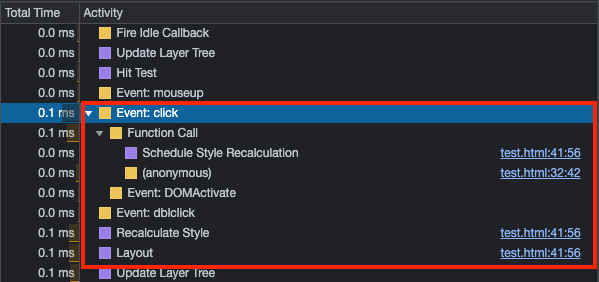
이와 같이 Layout 과정이 한 번 찍혀 있고, reflow가 한 번 발생했습니다.
다음으로, BAD 코드의 퍼포먼스 결과는
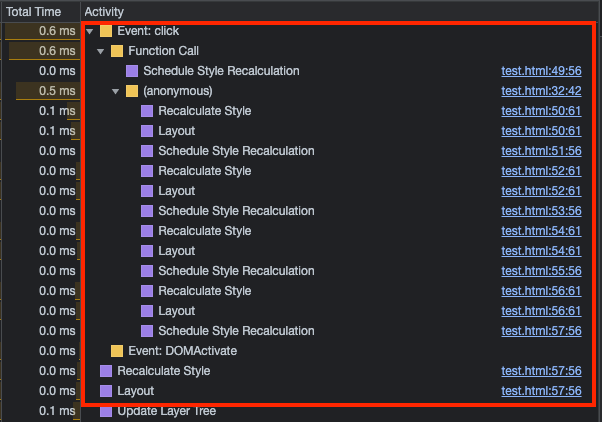
이와 같이 Layout 과정이 5번 찍혀 있고, reflow가 5번 발생했음을 알 수 있었습니다.
위의 결과를 바탕으로 reflow의 발생 위치를 확인하면 다음과 같습니다.
let flag = true
document.addEventListener('click', () => {
  flag = !flag
  if (flag) {
    // GOOD
    const box1Height = document.querySelector('.box1').clientHeight
    const box2Height = document.querySelector('.box2').clientHeight
    const box3Height = document.querySelector('.box3').clientHeight
    const box4Height = document.querySelector('.box4').clientHeight
    const box5Height = document.querySelector('.box5').clientHeight

    // 🚨 **Reflow**
    document.querySelector('.box1').style.height = box1Height + 500 + 'px'
    document.querySelector('.box2').style.height = box2Height + 500 + 'px'
    document.querySelector('.box3').style.height = box3Height + 500 + 'px'
    document.querySelector('.box4').style.height = box4Height + 500 + 'px'
    document.querySelector('.box5').style.height = box5Height + 500 + 'px'
  } else {
    // BAD
    const box1Height = document.querySelector('.box1').clientHeight
    document.querySelector('.box1').style.height = box1Height - 500 + 'px'
    // 🚨 **Reflow**
    const box2Height = document.querySelector('.box2').clientHeight
    document.querySelector('.box2').style.height = box2Height - 500 + 'px'
    // 🚨 **Reflow**
    const box3Height = document.querySelector('.box3').clientHeight
    document.querySelector('.box3').style.height = box3Height - 500 + 'px'
    const box4Height = document.querySelector('.box4').clientHeight
    // 🚨 **Reflow**
    document.querySelector('.box4').style.height = box4Height - 500 + 'px'
    // 🚨 **Reflow**
    const box5Height = document.querySelector('.box5').clientHeight
    // 🚨 **Reflow**
    document.querySelector('.box5').style.height = box5Height - 500 + 'px'
  }
})
보통 모니터가 60Hz라서 16.6ms마다 화면을 그리는데, 예를 들어 element의 x를 0에서 100으로, 100에서 200으로 하는 식으로 style 변경이 일어날 경우 한 번에 묶어두었다가 주사율이 변경될 때, 즉 프레임1 → 프레임2로 넘어갈 때 한 번에 처리합니다. 하지만 예를 들어 x를 0에서 200으로 옮긴 후에 style 정보를 가져오는 상황과 같이 style 변경 후에 style 정보를 가져오게 되면, 변경된 style 정보는 실제 스타일 변경이 이루어진 후에나 가져올 수 있으므로 강제 reflow를 시키게 됩니다.
내용을 코드와 함께 보면,
let flag = true
document.addEventListener('click', () => {
  flag = !flag
  if (flag) {
    // GOOD
    const box1Height = document.querySelector('.box1').clientHeight
    const box2Height = document.querySelector('.box2').clientHeight
    const box3Height = document.querySelector('.box3').clientHeight
    const box4Height = document.querySelector('.box4').clientHeight
    const box5Height = document.querySelector('.box5').clientHeight

    // 🚨 style 변경을 한 번에 묶어서 주사율이 변경될 때 처리. Reflow는 한 번만 일어난다.
    document.querySelector('.box1').style.height = box1Height + 500 + 'px'
    document.querySelector('.box2').style.height = box2Height + 500 + 'px'
    document.querySelector('.box3').style.height = box3Height + 500 + 'px'
    document.querySelector('.box4').style.height = box4Height + 500 + 'px'
    document.querySelector('.box5').style.height = box5Height + 500 + 'px'
  } else {
    // BAD
    const box1Height = document.querySelector('.box1').clientHeight
    document.querySelector('.box1').style.height = box1Height - 500 + 'px'
    // 🚨 위에서 style이 변경되었고 아래에서 style 정보를 가져오므로 강제 Reflow
    const box2Height = document.querySelector('.box2').clientHeight
    document.querySelector('.box2').style.height = box2Height - 500 + 'px'
    // 🚨 위에서 style이 변경되었고 아래에서 style 정보를 가져오므로 강제 Reflow
    const box3Height = document.querySelector('.box3').clientHeight
    document.querySelector('.box3').style.height = box3Height - 500 + 'px'
    const box4Height = document.querySelector('.box4').clientHeight
    // 🚨 위에서 style이 변경되었고 아래에서 style 정보를 가져오므로 강제 Reflow
    document.querySelector('.box4').style.height = box4Height - 500 + 'px'
    // 🚨 위에서 style이 변경되었고 아래에서 style 정보를 가져오므로 강제 Reflow
    const box5Height = document.querySelector('.box5').clientHeight
    // 🚨 style을 변경했으므로 Reflow 발생
    document.querySelector('.box5').style.height = box5Height - 500 + 'px'
  }
})